Úvod do Qiskitu
V tomto notebooku prozkoumáme, jak programovat kvantové brány a kvantové Circuit v Qiskitu, a dokonce jak je spouštět na simulátorech a skutečných kvantových počítačích pomocí vzorů Qiskit. Později si představíme různé způsoby kódování informací a zakončíme bonusovým příkladem kvantové teleportace.
Než začneš
Pokud jsi tak ještě neučinil/a, postupuj podle pokynů k instalaci a nastavení, včetně kroků pro nastavení pro použití IBM Quantum™ Platform.
Doporučujeme používat vývojové prostředí Jupyter pro práci s kvantovými počítači. Nezapomeň nainstalovat doporučenou dodatečnou podporu vizualizace ('qiskit[visualization]'). Pro druhou část tohoto příkladu budeš také potřebovat balíček matplotlib.
Pokud se chceš dozvědět více o kvantovém výpočtu obecně, navštiv kurz Základy kvantových informací na IBM Quantum Learning
Importy
# Added by doQumentation — required packages for this notebook
!pip install -q matplotlib numpy qiskit qiskit-aer qiskit-ibm-runtime
# Import necessary modules for this notebook
import time
import qiskit

from qiskit import QuantumCircuit
from qiskit.quantum_info import Statevector
from qiskit.visualization import plot_bloch_multivector, plot_state_qsphere
from qiskit_aer import AerSimulator
from qiskit.quantum_info import SparsePauliOp
from qiskit.transpiler.preset_passmanagers import generate_preset_pass_manager
from qiskit_ibm_runtime import EstimatorV2 as Estimator
from qiskit_ibm_runtime import SamplerV2 as Sampler
from qiskit_ibm_runtime import QiskitRuntimeService
from qiskit.visualization import plot_histogram
print(qiskit.__version__)
2.3.1
Aby ses mohl/a spouštět kvantové obvody na hardwaru, musíš si nejprve nastavit účet. Postup je následující:
-
Přejdi na vylepšenou IBM Quantum® Platform.
-
Přejdi do pravého horního rohu (jak je zobrazeno na obrázku výše), vytvoř svůj API token a zkopíruj ho na bezpečné místo.
-
V další buňce nahraď
deleteThisAndPasteYourAPIKeyHeresvým API klíčem. -
Přejdi do levého dolního rohu (jak je zobrazeno na obrázku výše) a vytvoř svou instanci. Ujisti se, že zvolíš otevřený plán.
-
Po vytvoření instance zkopíruj přiřazený CRN kód. Možná bude nutné stránku obnovit, aby se instance zobrazila.
-
V buňce níže nahraď
deleteThisAndPasteYourCRNHeresvým CRN kódem.
Více podrobností o nastavení účtu IBM Cloud® najdeš v tomto průvodci.
⚠️ Poznámka: Zacházej se svým API klíčem jako s bezpečným heslem. Více informací o používání API klíče v bezpečných i nedůvěryhodných prostředích najdeš v průvodci Nastavení cloudu.
#your_api_key = "deleteThisAndPasteYourAPIKeyHere"
#your_crn = "deleteThisAndPasteYourCRNHere"

QiskitRuntimeService.save_account(
    channel="ibm_quantum_platform",
    token=your_api_key,
    instance=your_crn,
    overwrite=True
)
1. Kvantové Gate a kvantové Circuit
Kvantové Circuit jsou modely pro kvantový výpočet, v nichž výpočet tvoří posloupnost kvantových Gate. Podívejme se na některé z populárních kvantových Gate.
X Gate
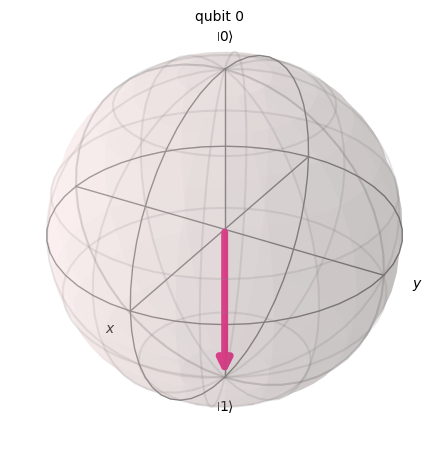
X Gate odpovídá rotaci kolem osy X Blochovy sféry o radiánů. Zobrazuje na a na . Je to kvantový ekvivalent brány NOT pro klasické počítače a někdy se nazývá bit-flip.
# Let's apply an X-gate on a |0> qubit
qc = QuantumCircuit(1)
qc.x(0)
qc.draw(output='mpl')

# Let's see Bloch sphere visualization
sv = Statevector(qc)
plot_bloch_multivector(sv)
H Gate
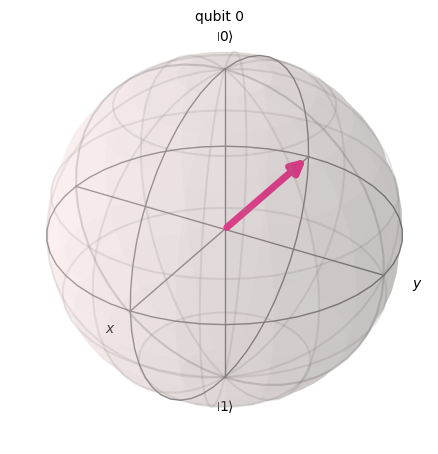
Hadamardova brána představuje rotaci o kolem osy, která leží uprostřed mezi osou a osou .
Zobrazuje bázový stav na , což znamená, že měření bude mít stejné pravděpodobnosti pro výsledek 1 nebo 0, čímž vzniká 'superpozice' stavů. Tento stav se také zapisuje jako .
# Let's apply an H-gate on a |0> qubit
qc = QuantumCircuit(1)
qc.x(0)
qc.h(0)
qc.draw(output='mpl')

# Let's see Bloch sphere visualization
sv = Statevector(qc)
plot_bloch_multivector(sv)
CX Gate (CNOT Gate)
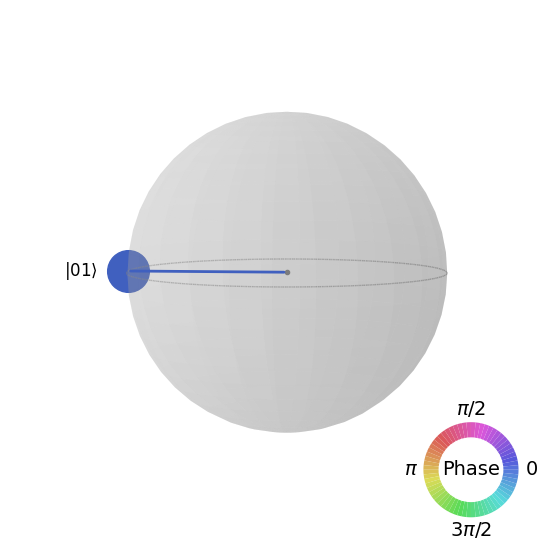
Řízená NOT brána (neboli CNOT nebo CX) působí na dva qubit. Provede operaci NOT (ekvivalentní aplikaci X Gate) na druhém qubit pouze tehdy, když první qubit je , jinak ho nechá beze změny. Poznámka: Qiskit čísluje bity v řetězci zprava doleva.
# Let's apply a CX-gate on |11>
qc = QuantumCircuit(2)
qc.x(0)
qc.x(1)
qc.cx(0,1)
qc.draw(output='mpl')

sv=Statevector(qc)
plot_state_qsphere(sv)
Vytvoř první Bellův stav
# Create a Bell state circuit

qc = QuantumCircuit(2)
qc.h(0)
qc.cx(0,1)

# Draw the circuit
qc.draw("mpl")

# Plot the state using q-sphere visualization
sv = Statevector(qc)
plot_state_qsphere(sv)
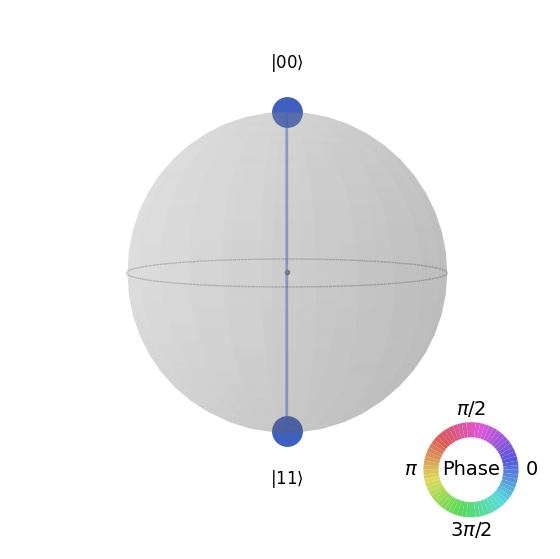
# q-sphere is useful for visualizing states when Bloch sphere fails to
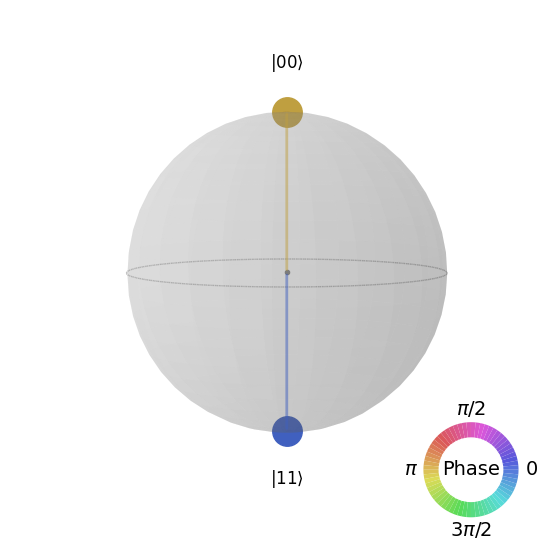
Vytvoř druhý Bellův stav
# Create a circuit with the second Bell state

qc = QuantumCircuit(2)
qc.x(0)
qc.h(0)
qc.cx(0,1)

qc.draw("mpl")

Vysvětlení spočívá v tom, že:
# Get the statevector of the circuit
sv = Statevector(qc)

# Plot the state using qsphere visualization
plot_state_qsphere(sv)
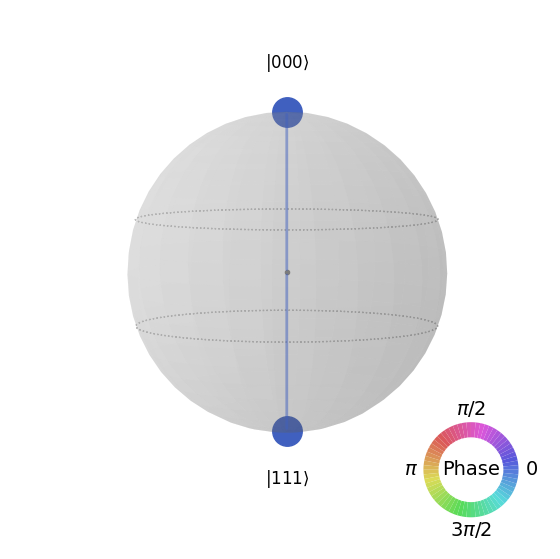
Vytvoř 3-qubitový stav GHZ
# Create a circuit with 3-qubit GHZ state

qc= QuantumCircuit(3)
qc.h(0)
qc.cx(0,1)
qc.cx(0,2)

qc.draw("mpl")

# Get the statevector of the circuit
sv = Statevector(qc)

# Plot the state using qsphere visualization
plot_state_qsphere(sv)
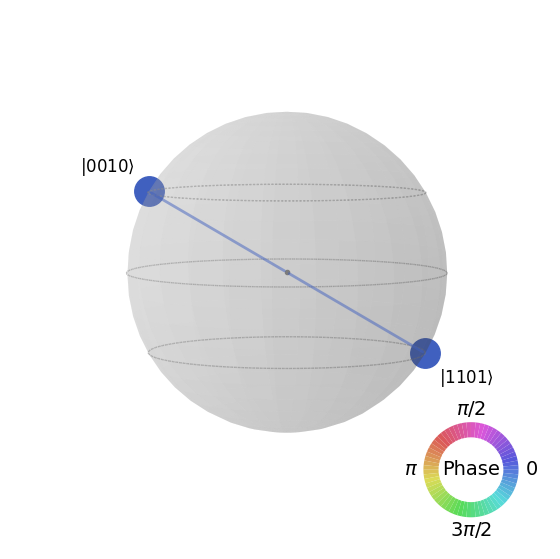
Vytvoř stav loga Qiskit

# Create a circuit with the Qiskit logo state

qc = QuantumCircuit(4)
qc.h(0)
qc.cx(0,1)
qc.cx(0,2)
qc.cx(0,3)
qc.x(1)

# Draw the circuit
qc.draw("mpl")

# Get the statevector of the circuit
sv = Statevector(qc)

# Plot the state using qsphere visualization
plot_state_qsphere(sv)
2. Vytvoř a spusť jednoduchý kvantový program
Čtyři kroky k napsání kvantového programu pomocí vzorů Qiskit jsou:
-
Mapuj problém do formátu nativního pro kvantové počítače.
-
Optimalizuj Circuit a operátory.
-
Spusť pomocí primitivní kvantové funkce.
-
Analyzuj výsledky.
2.1 Namapujte problém na kvantově nativní formát
V kvantovém programu jsou kvantové obvody nativním formátem pro reprezentaci kvantových instrukcí a operátory reprezentují pozorovatelné veličiny, které se mají měřit. Při vytváření obvodu obvykle vytvoříš nový objekt QuantumCircuit a poté do něj postupně přidáváš instrukce.
Následující buňka kódu vytváří obvod, který produkuje stav GHZ – stav, ve kterém jsou tři qubity plně provázány navzájem.
Qiskit SDK používá číslování bitů LSb 0, kde číslice má hodnotu nebo . Více podrobností najdeš v tématu Bit-ordering in the Qiskit SDK.
# Create a GHZ state circuit

qc = QuantumCircuit(3)
qc.h(0)
qc.cx(0,1)
qc.cx(0,2)
# Draw the circuit
qc.draw("mpl")
V dokumentaci najdeš všechny dostupné operace v sekci QuantumCircuit.
Při vytváření kvantových obvodů musíš také zvážit, jaký typ dat chceš po provedení vrátit. Qiskit poskytuje dva způsoby, jak vrátit data: můžeš získat rozdělení pravděpodobnosti pro sadu qubitů, které se rozhodneš měřit, nebo můžeš získat střední hodnotu pozorovatelné veličiny. Připrav svou úlohu tak, aby měřila tvůj obvod jedním z těchto dvou způsobů pomocí primitiv Qiskit (podrobně vysvětleno v kroku 3).
Tento příklad měří střední hodnoty pomocí submodulu qiskit.quantum_info, který je specifikován pomocí operátorů (matematické objekty používané k reprezentaci akce nebo procesu, který mění kvantový stav). Následující buňka kódu vytváří šest tříqubitových Pauliho operátorů: ZZZ, ZZX, ZII, XXI, ZZI a III.
# Set up six different observables.

observables_labels = ["ZZZ", "ZZX", "ZII", "XXI", "ZZI", "III"]

observables = [SparsePauliOp(label) for label in observables_labels]
print(observables)
[SparsePauliOp(['ZZZ'],
              coeffs=[1.+0.j]), SparsePauliOp(['ZZX'],
              coeffs=[1.+0.j]), SparsePauliOp(['ZII'],
              coeffs=[1.+0.j]), SparsePauliOp(['XXI'],
              coeffs=[1.+0.j]), SparsePauliOp(['ZZI'],
              coeffs=[1.+0.j]), SparsePauliOp(['III'],
              coeffs=[1.+0.j])]
Zde je například operátor ZZI zkráceným zápisem pro tenzorový součin , což znamená měření Z na qubitu 2 a Z na qubitu 1 dohromady, přičemž získáváme informace o korelaci mezi qubitem 2 a qubitem 1. Střední hodnoty jako tato se také typicky zapisují jako .
Pokud je stav, který pozorujeme, tříqubitový stav GHZ, pak by měření mělo být 1.
2.2 Optimalizujte obvody a operátory
Při provádění obvodů na zařízení je důležité optimalizovat sadu instrukcí, které obvod obsahuje, a minimalizovat celkovou hloubku (přibližně počet instrukcí) obvodu. Tím zajistíš co nejlepší výsledky snížením vlivu chyb a šumu. Instrukce obvodu navíc musí odpovídat architektuře instrukční sady (ISA) backendového zařízení a musí zohledňovat základní Gate zařízení a propojení qubitů.
Následující kód vytvoří instanci skutečného zařízení, na které se odešle úloha, a transformuje obvod a operátory tak, aby odpovídaly ISA daného backendu. Pokud jsi dříve neuložil/a své přihlašovací údaje, postupuj podle pokynů zde pro ověření pomocí svého API tokenu.
# Choose a real backend
service = QiskitRuntimeService(channel='ibm_quantum_platform',)
backend = service.least_busy(min_num_qubits=156)
# print backend details
print(
    f"Name: {backend.name}\n"
    f"Version: {backend.backend_version}\n"
    f"No. of qubits: {backend.num_qubits}\n"
    f"Processor type: {backend.processor_type}\n"
)
Name: ibm_marrakesh
Version: 1.0.21
No. of qubits: 156
Processor type: {'family': 'Heron', 'revision': '2'}
# option to use the AerSimulator instead of a real quantum device
seed_sim=42
backend=AerSimulator.from_backend(backend,seed_simulator=seed_sim)
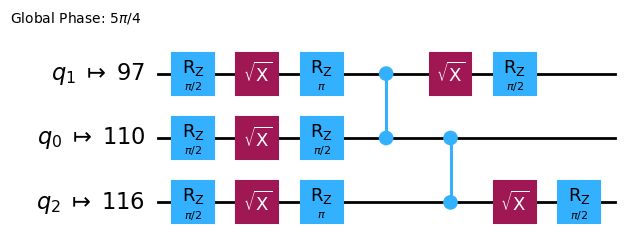
Transpiluj obvod do ISA obvodu
# Convert to an ISA circuit and layout-mapped observables.

pm = generate_preset_pass_manager(backend=backend, optimization_level=2)
isa_circuit = pm.run(qc)

isa_circuit.draw("mpl", idle_wires=False)
mapped_observables = [
    observable.apply_layout(isa_circuit.layout) for observable in observables
]
print(mapped_observables)
[SparsePauliOp(['IIIIIIIIIIIIIIIIZIIIIIZIIIIIIIIIIIIZIIIIIIIIIIIIIIIIIIIIIIIIIIIIIIIIIIIIIIIIIIIIIIIIIIIIIIIIIIIIIIIIIIIIIIIIIIIIIIIIIIIIIIIIIIIIIIIII'],
              coeffs=[1.+0.j]), SparsePauliOp(['IIIIIIIIIIIIIIIIZIIIIIXIIIIIIIIIIIIZIIIIIIIIIIIIIIIIIIIIIIIIIIIIIIIIIIIIIIIIIIIIIIIIIIIIIIIIIIIIIIIIIIIIIIIIIIIIIIIIIIIIIIIIIIIIIIIII'],
              coeffs=[1.+0.j]), SparsePauliOp(['IIIIIIIIIIIIIIIIZIIIIIIIIIIIIIIIIIIIIIIIIIIIIIIIIIIIIIIIIIIIIIIIIIIIIIIIIIIIIIIIIIIIIIIIIIIIIIIIIIIIIIIIIIIIIIIIIIIIIIIIIIIIIIIIIIIII'],
              coeffs=[1.+0.j]), SparsePauliOp(['IIIIIIIIIIIIIIIIXIIIIIIIIIIIIIIIIIIXIIIIIIIIIIIIIIIIIIIIIIIIIIIIIIIIIIIIIIIIIIIIIIIIIIIIIIIIIIIIIIIIIIIIIIIIIIIIIIIIIIIIIIIIIIIIIIIII'],
              coeffs=[1.+0.j]), SparsePauliOp(['IIIIIIIIIIIIIIIIZIIIIIIIIIIIIIIIIIIZIIIIIIIIIIIIIIIIIIIIIIIIIIIIIIIIIIIIIIIIIIIIIIIIIIIIIIIIIIIIIIIIIIIIIIIIIIIIIIIIIIIIIIIIIIIIIIIII'],
              coeffs=[1.+0.j]), SparsePauliOp(['IIIIIIIIIIIIIIIIIIIIIIIIIIIIIIIIIIIIIIIIIIIIIIIIIIIIIIIIIIIIIIIIIIIIIIIIIIIIIIIIIIIIIIIIIIIIIIIIIIIIIIIIIIIIIIIIIIIIIIIIIIIIIIIIIIIII'],
              coeffs=[1.+0.j])]
2.3 Spusťte pomocí kvantových primitiv
Kvantové počítače mohou produkovat náhodné výsledky, takže obvykle shromažďuješ vzorek výstupů opakovaným spouštěním obvodu. Střední hodnotu pozorovatelné veličiny můžeš odhadnout pomocí třídy Estimator. Estimator je jedním ze dvou primitiv; druhým je Sampler, který lze použít k získání dat z kvantového počítače. Tyto objekty mají metodu run(), která spouští výběr obvodů, pozorovatelných veličin a parametrů (pokud jsou relevantní) pomocí primitive unified bloc (PUB).
Při spouštění tohoto kódu na skutečném kvantovém hardwaru zvažte použití technik pro potlačení a zmírnění chyb ke snížení vnitřního šumu kvantového počítače.
# Construct the Estimator instance.
estimator = Estimator(mode=backend)
estimator.options.resilience_level = 1
estimator.options.default_shots = 5000
Odešli úlohu pomocí primitiva Estimator.
# One pub, with one circuit to run against six different observables.
job = estimator.run([(isa_circuit, mapped_observables)])

# Use the job ID to retrieve your job data later
print(f">>> Job ID: {job.job_id()}")
>>> Job ID: 97ecd036-1767-49b0-a1dc-c71638c3c3c4
/Users/jma/miniconda3/envs/3122/lib/python3.12/site-packages/qiskit_ibm_runtime/fake_provider/local_service.py:187: UserWarning: The resilience_level option has no effect in local testing mode.
  warnings.warn("The resilience_level option has no effect in local testing mode.")
Po odeslání úlohy můžeš buď počkat, dokud není úloha dokončena ve stávající instanci Pythonu, nebo použít job_id k pozdějšímu získání dat. (Podrobnosti najdeš v sekci o načítání úloh.)
Po dokončení úlohy prozkoumej její výstup prostřednictvím atributu result() úlohy.
# This is the result of the entire submission.  You submitted one Pub,
# so this contains one inner result (and some metadata of its own).
job_result = job.result()

# This is the result from our single pub, which had six observables,
# so contains information on all six.
pub_result = job.result()[0]
Nyní můžeme také spustit obvod pomocí primitiva Sampler
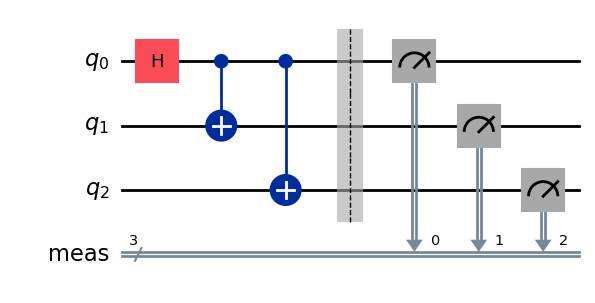
# We include the measurements in the circuit
qc.measure_all()
sampler = Sampler(mode=backend)
qc.draw(output="mpl")
Odešli úlohu pomocí primitiva Sampler.
job_sampler = sampler.run(pm.run([qc]))

# Use the job ID to retrieve your job data later
print(f">>> Job ID: {job_sampler.job_id()}")
# Get the results
results_sampler = job_sampler.result()
>>> Job ID: a6ee4d2f-c80d-4a86-9a76-e4b1a74502e7
2.4 Analyzuj výsledky
Krok analýzy je zpravidla místo, kde výsledky dodatečně zpracuješ – například pomocí zmírňování chyb měření nebo extrapolace nulového šumu (ZNE). Tyto výsledky pak můžeš předat do dalšího pracovního postupu k dalšímu rozboru, nebo připravit graf klíčových hodnot a dat. Obecně platí, že tento krok je specifický pro tvůj konkrétní problém. V tomto příkladu vykresli každou z očekávaných hodnot, které byly pro náš obvod změřeny.
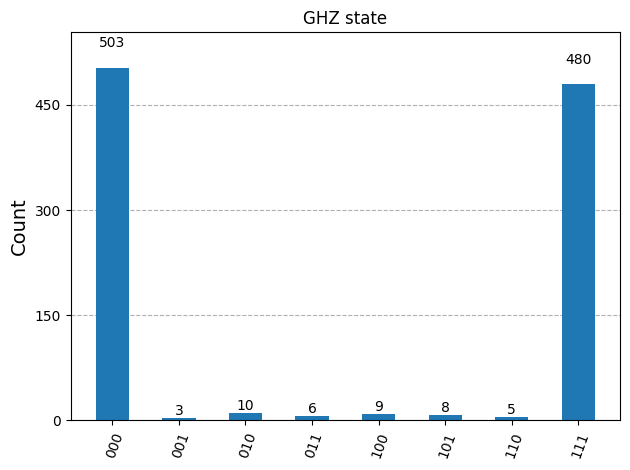
Očekávané hodnoty a směrodatné odchylky pro observabely, které jsi zadal/a do Estimatoru, jsou přístupné přes atributy PubResult.data.evs a PubResult.data.stds výsledku jobu. Chceš-li získat výsledky ze Sampleru, použij funkci PubResult.data.meas.get_counts(), která vrátí dict měření v podobě bitových řetězců jako klíčů a počtů jako jejich odpovídajících hodnot. Více informací najdeš v části Začínáme se Samplerem.
# Plot the result
from matplotlib import pyplot as plt
values = pub_result.data.evs
errors = pub_result.data.stds
# plotting graph
# Plotting with error bars
plt.errorbar(observables_labels, values, yerr=errors, fmt='-o', capsize=5)
plt.xlabel("Observables")
plt.ylabel("Values")
plt.title("Plot of Observables vs Values with Error Bars")
plt.grid(True)
plt.tight_layout()
plt.show()
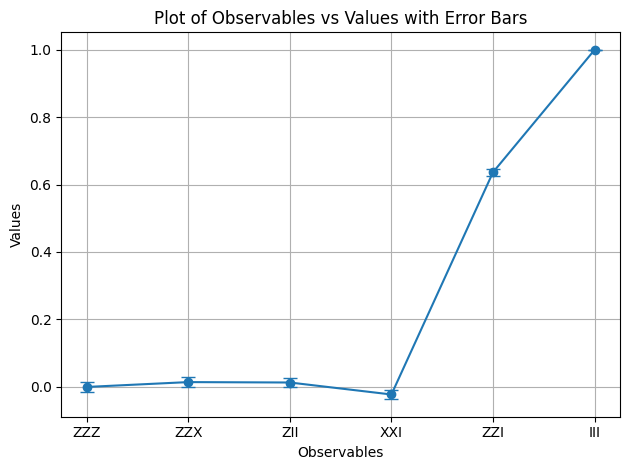
Vidíme, že observabely a mají očekávanou hodnotu 1 – totiž zavádí dvě záporná znaménka, která se navzájem vyruší, a působí jako identita, takže stav GHZ zůstane nezměněn. Ostatní observabely mají očekávanou hodnotu 0, protože jejich operátory zavádějí lichý počet záporných znamének, nebo operátory překlopí takový počet qubitů, že se překrývající se stavy stanou ortogonálními.
Nyní vykreslíme výsledky pro Sampler.
counts_list = results_sampler[0].data.meas.get_counts()
print(counts_list)
print(f"Outcomes : {counts_list}")
display(plot_histogram(counts_list, title="GHZ state"))
{'111': 480, '000': 503, '101': 8, '100': 9, '001': 3, '011': 6, '010': 10, '110': 5}
Outcomes : {'111': 480, '000': 503, '101': 8, '100': 9, '001': 3, '011': 6, '010': 10, '110': 5}
2.5 Škálování na velký počet qubitů
V kvantovém počítání je práce na úrovni utility (utility-scale) klíčová pro pokrok v oboru. Taková práce vyžaduje výpočty v mnohem větším měřítku – práci s Circuity, které mohou využívat více než 100 Qubitů a více než 1000 Gate. Tento příklad dělá malý krůček tímto směrem a škáluje problém GHZ na Qubitů. Využívá pracovní postup Qiskit patterns a na závěr měří očekávanou hodnotu .
Krok 1. Namapuj problém
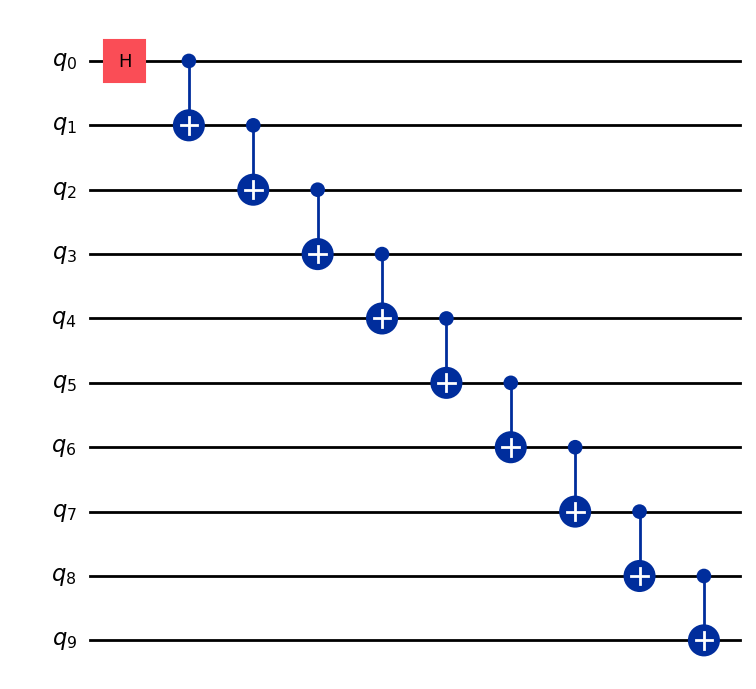
Napiš funkci, která vrátí QuantumCircuit připravující -qubitový stav GHZ (v podstatě rozšířený Bellův stav), pak tuto funkci použij k přípravě 10-qubitového stavu GHZ a sesbírej observabely, které chceš měřit.
def get_qc_for_n_qubit_GHZ_state(n: int) -> QuantumCircuit:

    qc = QuantumCircuit(n)
    qc.h(0)
    for i in range(n-1):
        qc.cx(i, i+1)
    return qc
n = 10
qc_n_GHZ = get_qc_for_n_qubit_GHZ_state(n)
qc_n_GHZ.draw("mpl")
Dále namapuj operátory, které tě zajímají. Tento příklad používá operátory ZZ mezi Qubity ke zkoumání chování při jejich rostoucí vzdálenosti. Čím méně přesné (zkreslené) očekávané hodnoty mezi vzdálenými Qubity by odhalily míru přítomného šumu.
# ZZII...II, ZIZI...II, ... , ZIII...IZ
operator_strings = [
    "Z" + i * "I" + "Z" + "I" * (n-i-2) for i in range(n-1)
]
print(operator_strings)
print(len(operator_strings))

operators = [SparsePauliOp(operator) for operator in operator_strings]
['ZZIIIIIIII', 'ZIZIIIIIII', 'ZIIZIIIIII', 'ZIIIZIIIII', 'ZIIIIZIIII', 'ZIIIIIZIII', 'ZIIIIIIZII', 'ZIIIIIIIZI', 'ZIIIIIIIIZ']
9
Krok 2. Optimalizuj problém pro spuštění na kvantovém Backendu
Transformuj Circuit a observabely tak, aby odpovídaly ISA Backendu.
# Convert to an ISA circuit and layout-mapped observables.
pm = generate_preset_pass_manager(backend=backend, optimization_level=2)
isa_circuit = pm.run(qc_n_GHZ)
isa_operators_list = [operator.apply_layout(isa_circuit.layout) for operator in operators]
Krok 3. Spusť na Backendu
Odešli job, a pokud ho spouštíš na hardwaru, zapni potlačení chyb pomocí techniky zvané dynamical decoupling. Úroveň odolnosti (resilience level) určuje, jak silnou ochranu před chybami chceš vybudovat. Vyšší úrovně poskytují přesnější výsledky, ale za cenu delší doby zpracování. Další vysvětlení možností nastavených v následujícím kódu najdeš v části Konfigurace zmírňování chyb pro Qiskit Runtime.
# Submit the circuit to Estimator
job = estimator.run([(isa_circuit, isa_operators_list)])
job_id = job.job_id()
/Users/jma/miniconda3/envs/3122/lib/python3.12/site-packages/qiskit_ibm_runtime/fake_provider/local_service.py:187: UserWarning: The resilience_level option has no effect in local testing mode.
  warnings.warn("The resilience_level option has no effect in local testing mode.")
Krok 4. Dodatečně zpracuj výsledky
Abychom lépe pochopili chování provázaných kvantových stavů na reálném hardwaru, analyzujeme párové korelace mezi Qubity v bázi Z. Konkrétně se zaměříme na očekávané hodnoty ⟨Z₀Zᵢ⟩, které měří, jak silně je qubit 0 korelován s každým dalším Qubitem i. Budeme zejména kreslit:
Jaké hodnoty očekáváš v grafu?
Možnosti:
a) Klesající s rostoucím
b) Konstantní, rovno 1
c) Malé odchylky kolem 1
d) Střídavě 1 a 0 pro liché a sudé hodnoty
data = list(range(1, len(operators) + 1))  # Distance between the Z operators
result = job.result()[0]
values = result.data.evs  # Expectation value at each Z operator.
values = [
    v / values[0] for v in values
]  # Normalize the expectation values to evaluate how they decay with distance.

plt.plot(data, values, marker="o", label=f"{n}-qubit GHZ state")
plt.xlabel("Distance between qubits $i$")
plt.ylabel(r"$\langle Z_i Z_0 \rangle / \langle Z_1 Z_0 \rangle $")
plt.legend()
plt.show()
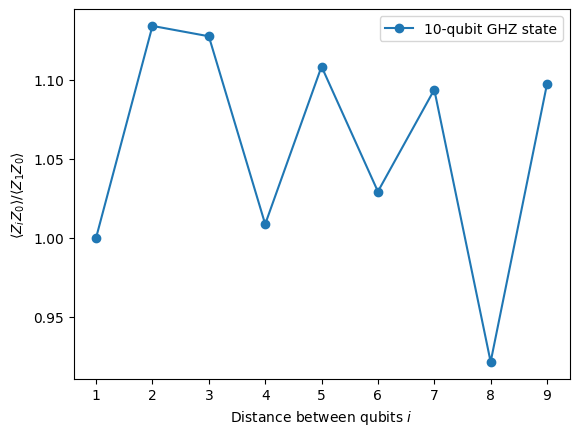
V tomto grafu si všimni, že kolísá kolem hodnoty 1, přestože v ideální simulaci by všechny měly být rovny 1.
Jak vidíš, výsledky experimentů s 10 Qubity jsou dobré, ale stále obsahují určité chyby. Jedním ze způsobů, jak výsledky zlepšit, je implementovat stav GHZ efektivněji.
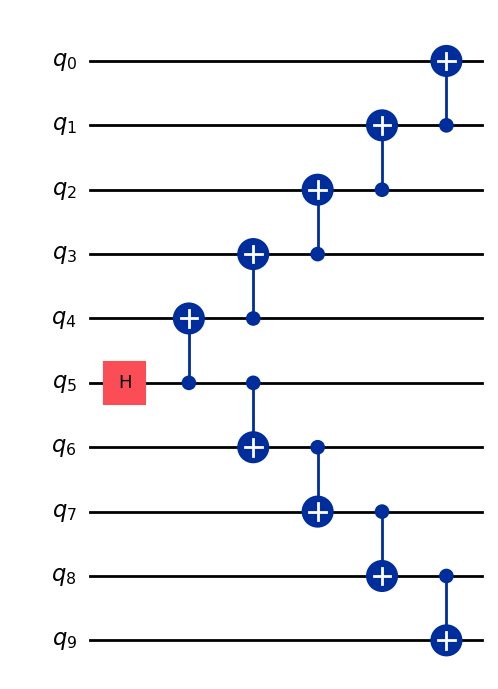
Obvykle se stav GHZ implementuje schodišťovou posloupností CNOT Gate. Lze ho ale implementovat efektivněji – hloubku 2-qubitových Gate lze snížit z n na n/2 nebo méně.
Jednou z důležitých metrik pro posouzení přesnosti výsledků, respektive míry šumu v Circuitu, je hloubka 2-qubitových Gate. Je tomu tak proto, že míry chyb 2-qubitových Gate (přibližně 10× vyšší než u jednoQubitových Gate) dominují celkovým chybám Circuitu. K získání hloubky 2-qubitových Gate Circuitu použij následující kód.
qc.depth(lambda x: x.operation.num_qubits == 2)
def better_ghz(n):
    "fan out"
    s = int(n / 2)
    qc = QuantumCircuit(n)
    qc.h(s)
    for m in range(s, 0, -1):
        qc.cx(m, m - 1)
        if not (n % 2 == 0 and m == s):
            qc.cx(n - m - 1, n - m)
    return qc

better_ghz(n).draw("mpl")
# Check 2-qubit gate depth before transpilation
qc_better_ghz = better_ghz(n)
qc_better_ghz.depth(lambda x: x.operation.num_qubits == 2)
5
Zajímavé je, že se nám podařilo snížit kvantovou hloubku Circuitu, který chceme spustit, pouhou chytrostí a promyšlením jiného způsobu jeho naprogramování. Nastanou ale situace a algoritmy, kdy se na tyto chytré triky nemůžeme spoléhat. Právě zde přichází vhod Transpiler – pomáhá nám efektivně optimalizovat všechny tyto aspekty, abychom se o ně nemuseli příliš starat.
3. Kódování informace
3.1 Amplitudové kódování
Teď, když jsme viděli, jak sestavovat kvantové obvody, je zajímavé prozkoumat, jak můžeme kódovat klasické informace do kvantových stavů. Jednou z výkonných metod je amplitudové kódování, kde amplitudy kvantového stavu reprezentují složky klasického vektoru.
Uvažujme jednoduchý příklad. Předpokládejme, že chceme zakódovat klasický vektor
do kvantového stavu dvou qubitů. Cílem je připravit kvantový stav:
kde (nebo ) a vektor je normalizován tak, aby platilo:
Nyní uvažujeme konkrétní příklad:
Odpovídající kvantový stav je pak:
Tento stav lze připravit pomocí kombinace rotačních Gate o úhlech a pro qubit 0, resp. qubit 1.
from qiskit import QuantumCircuit
from qiskit_aer import AerSimulator
import numpy as np

qc = QuantumCircuit(2)

qc.ry(np.pi / 6, 0)
qc.ry(np.pi / 4, 1)

simulator = AerSimulator()
qc.save_statevector()
result = simulator.run(qc).result()
statevector = result.get_statevector()

print("Statevector:", statevector)
qc.draw(output="mpl")
Statevector: Statevector([0.8923991 +0.j, 0.23911762+0.j, 0.36964381+0.j,
             0.09904576+0.j],
            dims=(2, 2))

from qiskit.quantum_info import Statevector

# Define our vector
v = np.array([0.8924,  0.3696, 0.2391, 0.0990])
v = v/np.linalg.norm(v)
# Create a statevector from the vector
state = Statevector(v)

# Initialize a quantum circuit with 2 qubits
qc = QuantumCircuit(2)
qc.initialize(state.data, [0, 1])

# Optional: simulate the state
print("Statevector:", state)

# Visualize the circuit
qc.decompose().decompose().decompose().decompose().decompose().draw("mpl")
Statevector: Statevector([0.89242154+0.j, 0.36960892+0.j, 0.23910577+0.j,
             0.09900239+0.j],
            dims=(2, 2))
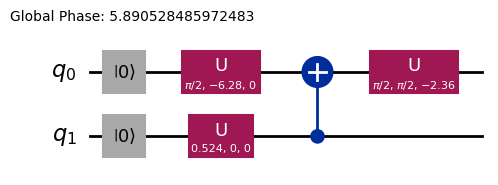
Viděli jsme tedy, jak kódovat informace pomocí rotačních Gate.
3.2 Angle encoding a parametrizované obvody
Zvláště zajímavým způsobem kódování informací do kvantového počítače je navrhování kvantového Circuit, který obsahuje určité rotační úhly nebo parametry, jež lze ladit tak, aby reprezentovaly rodinu funkcí . Uvažujme například následující parametrizovaný kvantový Circuit:
from qiskit import QuantumCircuit
from qiskit.circuit import Parameter

# Define a symbolic parameter
theta = Parameter("θ")

qc = QuantumCircuit(2)
# We applied a parametrized RX gate
qc.rx(theta, 0)
qc.cx(0, 1)
qc.draw("mpl")

Matematicky můžeme analyzovat, jaká rodina funkcí je tímto obvodem reprezentovatelná:
Je zcela zřejmé, že počet stavů, které lze tímto kvantovým Circuit reprezentovat, je omezený — například stavy nebo reprezentovat nelze. Rodina stavů, které lze reprezentovat, se však začne rozrůstat, jakmile zavedeme více rotací na vhodných místech:
from qiskit import QuantumCircuit
from qiskit.circuit import Parameter

# Define a symbolic parameter
theta1 = Parameter("θ1")
theta2 = Parameter("θ2")

qc = QuantumCircuit(2)
qc.rx(theta1, 0)
qc.rx(theta2, 1)
qc.cx(0, 1)
qc.draw("mpl")

V tomto případě budou kvantové stavy, které budeme reprezentovat, vypadat takto:
\begin{align*} \text{CNOT}_{01} \, R_x^{\{1}}(\theta_2) R_x^{\{0}}(\theta_1) \ket{00} &= \text{CNOT}_{01} \, R_x^{\{1}}(\theta_2)\left( \cos(\theta_1/2)\ket{00} - i\sin(\theta_1/2)\ket{10} \right) \\ &= \text{CNOT}_{01}\left( \cos(\theta_1/2)\cos(\theta_2/2)\ket{00} - i\cos(\theta_1/2)\sin(\theta_2/2)\ket{01} \right. \\ &\quad \left. - i\sin(\theta_1/2)\cos(\theta_2/2)\ket{10} + \sin(\theta_1/2)\sin(\theta_2/2)\ket{11} \right) \\ &= \cos(\theta_1/2)\cos(\theta_2/2)\ket{00} - i\cos(\theta_1/2)\sin(\theta_2/2)\ket{01} \\ &\quad + \sin(\theta_1/2)\sin(\theta_2/2)\ket{10} - i\sin(\theta_1/2)\cos(\theta_2/2)\ket{11} \end{align*}Vidíme, že tento Circuit generuje širší rodinu kvantových stavů než ten předchozí. Konkrétně nyní dokáže produkovat stavy s nenulovými amplitudami pro nebo , které s výše uvedeným Circuit nebyly možné. Tento Circuit však stále není univerzálním generátorem kvantových stavů, i když může být dostatečně výrazný pro navrhování obvodů s určitou flexibilitou pro reprezentaci jistých funkcí. Obecně platí, že čím více nezávislých parametrů (úhlů) zavedeme, tím větší expresivitu Circuit získá pro aproximaci libovolných kvantových stavů.
Ansatzes a knihovna Circuit
Tento druh parametrizovaného kvantového Circuit lze využít k sestavení Ansatzes — zkušebních kvantových stavů, jejichž cílem je aproximovat řešení daného problému. Tyto Ansatzes jsou ústřední součástí Variačních kvantových algoritmů, třídy hybridních kvantově-klasických algoritmů, které využívají kvantový počítač k vyhodnocení účelové funkce a klasický optimalizátor k její minimalizaci. Těmto tématům se budeme podrobně věnovat v pozdější části, ale prozatím si ukážeme, jak sestavit jednoduchý ansatz pomocí knihovny Circuit v Qiskit.
from qiskit.circuit.library import efficient_su2

SU2_ansatz = efficient_su2(4, su2_gates=["rx", "y"], entanglement="linear", reps=1)
SU2_ansatz.decompose().draw(output="mpl")
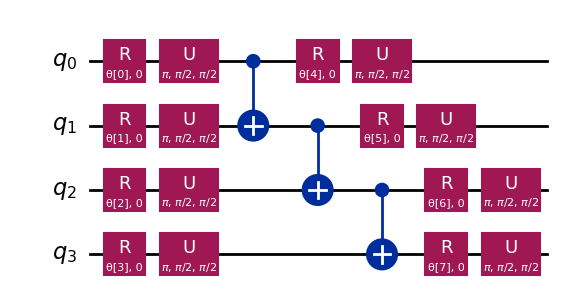
Viděli jsme, jak sestavit jednoduchý Ansatz pomocí funkce efficient_su2 z modulu qiskit.circuit.library, která dokáže generovat širokou škálu kvantových stavů laděním svých parametrů .
Závěr
V tomto notebooku ses naučil/a sestavovat kvantové Circuit — od budování kvantových Gate až po definování a měření observables — a jak tyto Circuit efektivně spouštět jak na simulátorech, tak na skutečném kvantovém hardwaru. Viděl/a jsi také, jak důležitý je pečlivý návrh Circuit pro minimalizaci chyb při práci se skutečnými kvantovými zařízeními, a také strategie pro škálování Circuit na větší počty qubitů, zejména na příkladu GHZ stavu. Dále ses seznámil/a s různými technikami kódování klasických informací do kvantových stavů, včetně amplitudového kódování a angle encodingu. S tím vším jsi plně vybaven/a k přechodu na další část a k zahájení práce s kvantovými algoritmy.
Instalace Qiskit Code Assistant ve VSCode
Klikni na odkaz a postupuj podle pokynů.
Bonus: Kvantová teleportace
Když uslyšíš pojem kvantová teleportace, možná si představíš futuristickou sci-fi technologii, která rozloží objekt na jednom místě a znovu ho sestaví někde daleko. Kvantová teleportace ale nevypadá vůbec takto. Ve skutečnosti se neteleportuje hmota, ale informace.
Kvantová teleportace umožňuje přenos kvantového stavu qubitu z jednoho místa na druhé. Přestože se tento přenos zdá být okamžitý, neporušuje zákony fyziky. Jak je to možné? Pojďme se podívat blíže!
Kvantová teleportace je protokol, který umožňuje odesílateli (Alici) přenést stav qubitu q příjemci (Bobovi) pomocí dvou klíčových zdrojů: sdíleného provázaného páru qubitů a a b a dvou bitů klasické komunikace c0 a c1.
Protokol v zásadě potřebuje:
q: Alicin qubit, původně ve stavu , který chceme teleportovat.a: Alicina polovina sdíleného provázaného páru.b: Bobova polovina sdíleného provázaného páru.c0,c1: Klasické bity pro uložení výsledků Aliciných měření.
A jak to funguje? Postup je následující:
-
Připrav Alicin stav na
q. Pro ověření vytvoříme konkrétní stav, například . -
Vytvoř provázání: Vygeneruj Bellův pár mezi
aab. -
Aliciny operace: Alice provede „Bellovo měření" na svých dvou qubitech (
qaa) a uloží klasické výsledky doc0ac1. -
Klasická komunikace: Alice pošle Bobovi své dva klasické bity (
c0,c1). -
Bobovy opravy: Bob aplikuje na svůj qubit (
b) specifické kvantové Gate (X a/nebo Z) podmíněně hodnotamic0ac1, které obdržel.
Pokud je vše provedeno správně, Bobův qubit b skončí ve stavu — původním stavu Alicina q!
Pro podrobnější vysvětlení a průzkum kvantové teleportace, včetně matematického zdůvodnění, proč tento protokol funguje, se můžeš podívat na výukové zdroje IBM Quantum: Quantum Teleportation. Toto je součástí kurzu Basics of Quantum Information.
import matplotlib.pyplot as plt
from qiskit import QuantumCircuit, QuantumRegister, ClassicalRegister
from qiskit_aer import AerSimulator
from qiskit.visualization import plot_histogram, plot_bloch_multivector

# Define individual quantum registers for each qubit
q = QuantumRegister(1, name='q')  # message qubit
a = QuantumRegister(1, name='a')  # Alice's entangled qubit
b = QuantumRegister(1, name='b')  # Bob's entangled qubit

# Classical register for Alice's measurements
cr_alice = ClassicalRegister(2, name='c_alice')

# Create quantum circuit
teleport_qc = QuantumCircuit(q, a, b, cr_alice, name='Teleportation')

# Step 1: Prepare message state |+⟩ on q
teleport_qc.h(q[0])
teleport_qc.barrier()

# Step 2: Create entanglement between a and b
teleport_qc.h(a[0])
teleport_qc.cx(a[0], b[0])
teleport_qc.barrier()

# Step 3: Alice's Bell measurement
teleport_qc.cx(q[0], a[0])
teleport_qc.h(q[0])
teleport_qc.barrier()

# Step 4: Alice measures q and a
teleport_qc.measure(q[0], cr_alice[0])
teleport_qc.measure(a[0], cr_alice[1])
teleport_qc.barrier()

# Step 5: Bob's conditional measurements
with teleport_qc.if_test((cr_alice[1], 1)):
    teleport_qc.x(b[0])
with teleport_qc.if_test((cr_alice[0], 1)):
    teleport_qc.z(b[0])

# Draw the circuit
teleport_qc.draw(output='mpl')
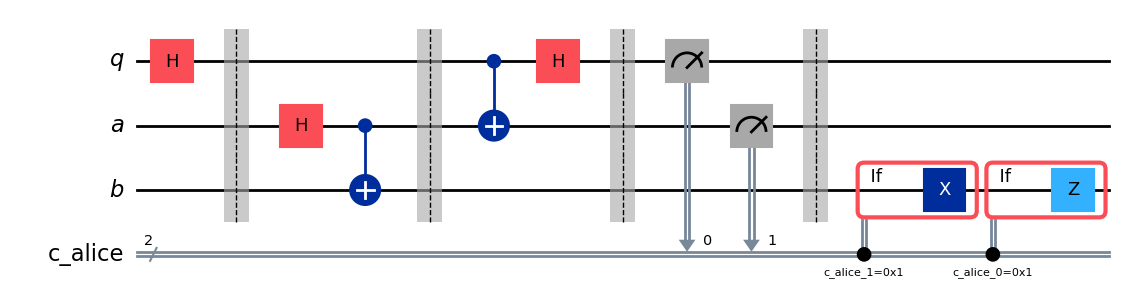
Po provedení protokolu vyvstává klíčová otázka: jak ověříme, že teleportace proběhla úspěšně? Stav Bobova qubitu po protokolu nemůžeme přímo „vidět". Protože jsme však Alicin počáteční stav připravili (zvolili jsme ), můžeme použít speciální typ simulace a zkontrolovat, zda Bobův qubit b skončil v tomtéž stavu.
Použijeme AerSimulator s save_statevector k ověření, zda Bobův qubit b skončí v Alicině původním stavu (). Tento simulátor vypočítá výsledný vektor kvantového stavu
a následně ho zobrazí pomocí plot_bloch_multivector, aby bylo možné vizualizovat Bobův qubit (b) v porovnání s Aliciným počátečním stavem (q).
# Simulate the teleportation circuit
sv_simulator = AerSimulator(method='statevector')
teleport_qc_sv = teleport_qc.copy()
teleport_qc_sv.save_statevector()

# Execute the circuit on the statevector simulator
job_sv = sv_simulator.run(teleport_qc_sv)
result_sv = job_sv.result()

# Get the final statevector
final_statevector = result_sv.get_statevector()
print("Visualizing final qubit states:")
display(plot_bloch_multivector(final_statevector))
print("Note that Alice's qubits have collapsed to |00⟩, |01⟩, |10⟩, or |11⟩, while Bob's qubit is in the original state |+⟩.")
Visualizing final qubit states:
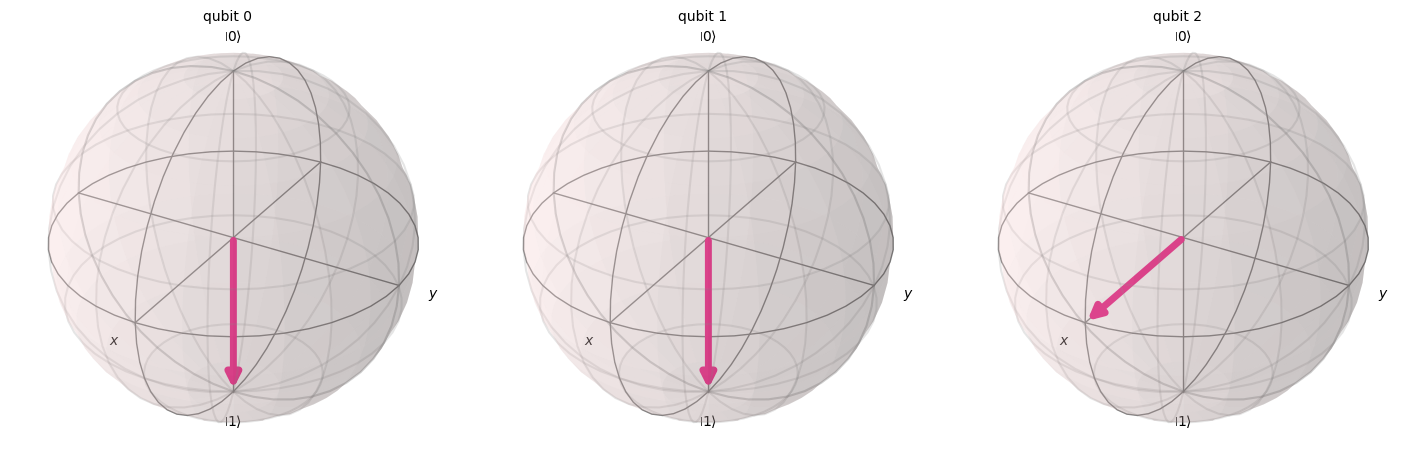
Note that Alice's qubits have collapsed to |00⟩, |01⟩, |10⟩, or |11⟩, while Bob's qubit is in the original state |+⟩.
Jak je z vizualizace patrné, první dva qubity (patřící Alici) se zhroutily do hodnoty 0 nebo 1. Mezitím třetí qubit (patřící Bobovi), zobrazený ve třetí Blochově sféře, míří podél osy x, což naznačuje, že se nachází ve stavu — úspěšně jsme tedy implementovali protokol kvantové teleportace!
Shrnutí
V tuto chvíli je vhodné stručně shrnout, čeho jsme dosáhli:
- Alice přenesla Bobovi neznámý kvantový stav.
- Nebyla přenesena žádná fyzická částice.
- Původní stav na Alicině qubitu byl zničen, v souladu s teorémem o neklonování.
Kvantová teleportace však stále vyžaduje klasickou komunikaci (výsledky Aliciných měření zaslané Bobovi), a to vysvětluje, proč tento proces neumožňuje přenos informací rychlejší než světlo a je plně v souladu se všemi známými zákony fyziky.